Tips
Amazon Listing Optimization: The Ultimate 2026 Guide to Better Rankings


So, 80% of Amazon sellers will tell you listing optimization matters a lot. But here’s the thing though—most are using rules for an algorithm that’s been gone since 2019! The reality is, the Amazon A10 algorithm changed how products rank. But, so much advice is stuck in the A9 days. This disconnect? It means sellers waste tons of time on listings that get ignored, rejected, or just plain disappear—and they don’t even connect with the right customers.
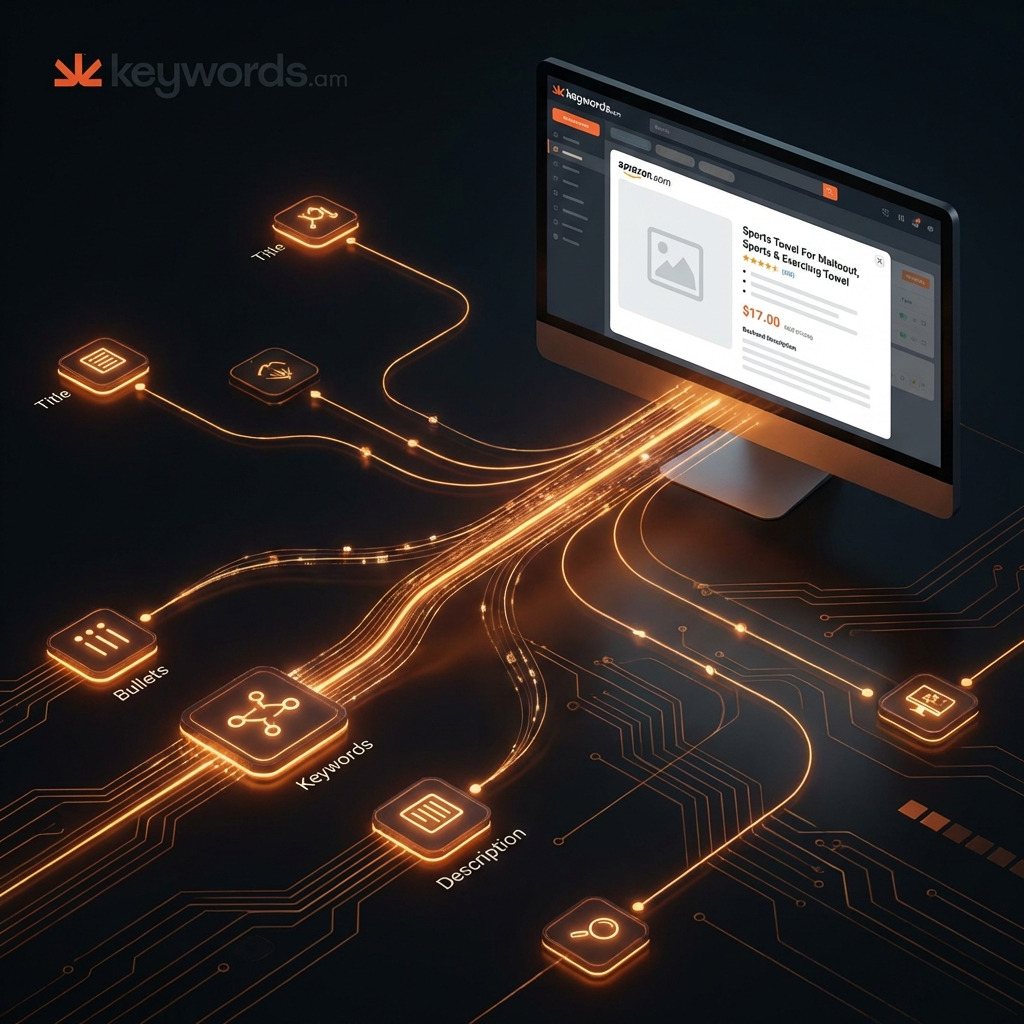
Table of Contents
- The A10 Algorithm: How Amazon Actually Ranks Listings in 2026
- The TFSD Framework: The Foundation of Amazon Listing Optimization
- Amazon Title Optimization: The 200-Byte Formula That Ranks
- Bullet Point Optimization: Features That Convert to Sales
- Backend Search Terms: The Hidden Ranking Multiplier
- Product Description Optimization: The Conversion Closer
- The Complete Amazon Listing Optimization Workflow
- 7 Amazon Listing Optimization Mistakes That Kill Your Rankings
- FAQ - Amazon Listing Optimization Questions
- Conclusion
⚡ TL;DR
- A10 Is About Relevance, Not Just Keywords: The algorithm now prioritizes listings that match searcher intent and demonstrate sales velocity, not just those stuffed with keywords.
- The TFSD Framework Is Essential: A structured approach focusing on Title, Features (Bullet Points), Search Terms (Backend), and Description is critical for weighted keyword distribution.
- Titles Are 200 Bytes, Not 200 Characters: Understanding the difference is key to avoiding title rejection, especially with special characters or in international marketplaces.
- Benefit-First Bullets Convert: Structure bullet points to lead with the primary customer benefit, followed by the feature that enables it, to drive conversions.
- Deduplication Is Non-Negotiable: Wasting backend keyword space on words already present in the title or bullets is a missed opportunity for broader keyword indexing.
- Mobile Optimization Is Mandatory: With over 70% of shoppers on mobile, listings must be optimized for smaller screens, focusing on the first 80 characters of the title and the first 200 of the bullets.
- Optimization Is an Ongoing Process: Listings are not “set and forget.” Regular audits, at least quarterly, are necessary to adapt to market changes and algorithm updates.
This guide? It’s all about optimizing Amazon listings for now - as they actually work in 2026. Honestly, it’s not your grandpa’s advice. I’m talking scannable title formulas, the psychology behind bullet points that sell, and, of course, sweet backend keyword tricks. The TFSD Framework—a system top sellers use—is really at the heart of it all.
And it’s designed to get you views and sales. Lots of ‘em. Truth is, it’s not just a quick list. It’s something you can trust. It explains not just what to do, but why it works from the algorithm’s point of view—and what your customers actually want.
The A10 Algorithm: How Amazon Actually Ranks Listings in 2026
To really kill it on Amazon, sellers need to understand the A10 algorithm. It’s not exactly easy. The shift from A9 to A10? Huge jump. A9 was mostly about keywords and sales - pretty simple. But truth is, A10 is way more complex now.
A10 uses way more signals than before. It tries to figure out what shoppers really want and whether a product seems trustworthy. Here’s what matters: understanding this shift is key to ranking higher - period. Five words. Simple.
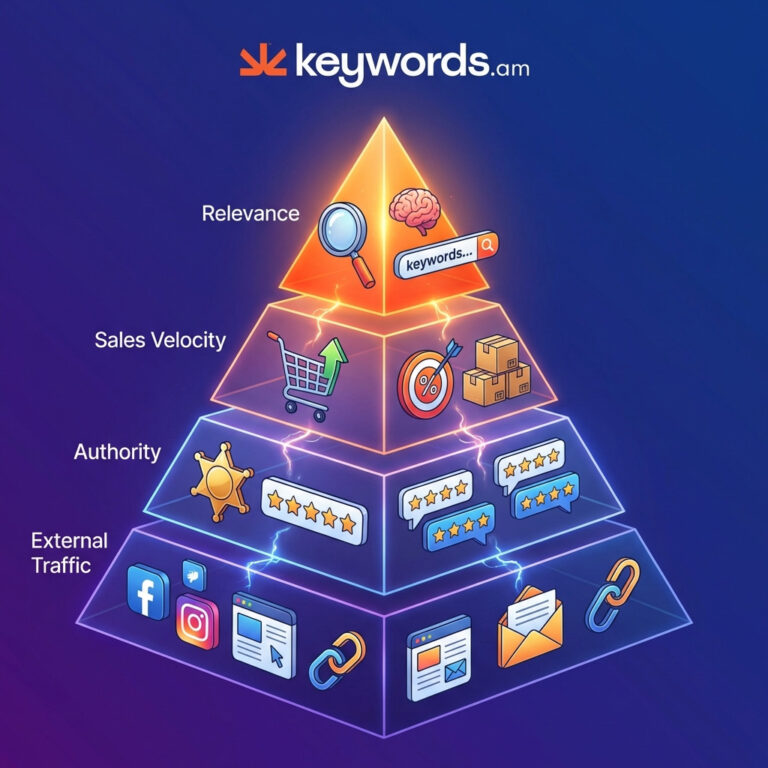
The ranking factors are pretty straightforward in 2026 – or so Amazon’s official SEO guidance says. Relevance comes first. Don’t match the searches? Forget about it - you won’t rank. Honestly, it won’t matter how awesome your other stuff is.
Next up is Sales Velocity – sales and conversion rate. A listing that gets bought a lot? Amazon sees that as a winner. Makes total sense, right? Authority is also important. That’s seller ratings, account health, and, of course, tons of great reviews. And finally, External Traffic - this can boost your rank. It shows that people like your product, even off Amazon.
That said, those are the big ones. But here’s the thing though - don’t just focus on those!
Worth noting: sales velocity is super important. And conversion rate? It’s king, from what I’ve noticed.
These factors impact how visible your listings are – keep ‘em in mind. I’ve seen sellers tell me that if you ignore these, your sales can really tank. It’s that important.
Understanding Relevance Signals
The A10 algorithm? It looks at relevance in tons of different ways.
Keyword relevance is first - basically, if your search terms show up in the listing’s indexed fields. But honestly, it goes way beyond just that.
Amazon checks for semantic relevance too. They realize “running shoes” and “jogging footwear” pretty much mean the same thing. So a listing using natural language will do better than one overloaded with exact keywords.
Click-through rate (CTR) - that’s a HUGE one.
If people click on your listing a lot from search results, Amazon sees that as a good sign, a real win. Listings that show up but don’t get clicks? Bad news, that’s a killer.
This feedback loop means your titles and images have to be eye-catching enough to get clicks – not just have keywords. You want those clicks, trust me!
Search intent matching is getting really smart; the reality is, Amazon sorts searches into informational, navigational, and transactional. For example, searching “how to use resistance bands” is different than “buy resistance bands.” Here’s the thing though, listings that match what people are really trying to do get preference.
Make your titles crystal clear about what your product is and what problem it solves. Sellers tell me this is really important, from what I’ve noticed.
Here’s what matters: all that “keyword stuffing” stuff? It actually hurts you now. Amazon’s Natural Language Processing (NLP) is good enough to spot text that sounds unnatural or repetitive.
I’ve seen titles crammed with keywords that just don’t read well get pushed down. Or at the very least, people just don’t click them because they look like spam. That’s the truth.
Consider this example:
- Stuffed Title: “Sleek Water Bottle Stainless Steel Water Bottle 1L Water Bottle for Gym Sports Water Bottle Leakproof”
- Natural Title: “Sleek 1L Stainless Steel Water Bottle, Leakproof for Gym & Sports”
The second title? It’s easier for a human to read. And the A10 algorithm likes it better too.
It uses high-intent keywords in a way that makes sense. That said, this shift - from tons of keywords to using the right ones strategically - is how you need to optimize your Amazon listings these days. The TFSD Framework gives you the system to make this happen.
The TFSD Framework: The Foundation of Amazon Listing Optimization
TFSD Framework? It’s how you get your Amazon listing totally optimized. It stands for Title, Features (Bullet Points), Search Terms (Backend), and Description. Here’s the thing though, it’s more than just a checklist.
This is the keyword priority as understood by the A10 algorithm. And trust me – I know what I’m talking about.
Order matters. Big time. Amazon weighs keywords differently, depending where they are. The Title? That’s got the most “ranking juice” – indexed with the highest weight. Simple. The Features (bullet points) are next. Then Search Terms (backend keywords), and finally, the Description. I’ve seen sellers treat all fields the same – a mistake, honestly. And that creates a weak keyword strategy, the truth is.
Don’t do that, seriously!
But here’s what matters: sellers tell me that a common error is treating all these fields as equal. That said, this can lead to a diluted keyword strategy. You don’t want that, do you?
Strategic Keyword Distribution
So, the TFSD framework? It’s pretty much how you decide where to put your keywords. High-volume keywords – honestly, they belong in the title. That’s where they’ll do the most good. Mid-volume keywords? Stick ‘em in your bullet points. And long-tail keywords can go in your backend search terms. The description gets whatever’s left over. Simple as that.
This beats just stuffing your titles with a bunch of nonsense. The reality is, you don’t want your best keywords buried, do you? Assign them properly, and you should see more clicks. You’ll probably sell more too – that’s the goal, right?
Here’s the thing though: keep an eye on those limits. They can change, depending on the marketplace you’re selling in. Sellers tell me – and I’ve seen it myself – that bytes matter, not just characters. Multi-byte characters (like ®, ™, and all that jazz) take up more space. Learned that the hard way!
| Marketplace | Title Limit | Backend Search Term Limit |
|---|---|---|
| USA | 200 bytes | 249 bytes |
| Canada | 200 bytes | 249 bytes |
| UK | 200 bytes | 249 bytes |
| Germany | 200 bytes | 249 bytes |
| Japan | 500 bytes | 249 bytes |
| Mexico | 200 bytes | 249 bytes |
| Australia | 200 bytes | 249 bytes |
It’s not keyword stuffing, I promise! But you spread keywords out strategically. Get them where they matter most – based on search volume. I’ve seen people talk about “green/yellow coverage.” “Green” keywords (title, bullets) are the most important. Secondary keywords? They’re “yellow” (backend, description). Makes sense, right?
Look, there are tools to help you with all this. Like the TFSD Framework guide from Keywords.am. They’ve got live counters and coverage indicators to guide you - you should check them out! TFSD Framework guide. That’s pretty useful, I think.

Amazon Title Optimization: The 200-Byte Formula That Ranks
Your Amazon product title? It’s huge. Honestly, it’s probably the most important factor in getting your listing seen. I’m telling you, it impacts ranking more than pretty much anything.
As of January 2025, the rules changed - big time. Amazon strictly enforces a 200-byte limit for product title length. This applies in most categories in the US marketplace - pretty much everywhere, yeah. I’ve seen sellers get away with exceeding it a tiny bit, but I wouldn’t risk it. Not worth the hassle, in my experience.
Here’s the thing though: bytes aren’t characters. Don’t make that mistake. ‘A’ is one byte. Simple enough, right? But a character like ’®’? It can be three bytes. Sellers tell me this all the time. It’s happened to me a lot.
Exceed the 200-byte limit? Title rejected. That’s it. Don’t do it. Really.
The Title Formula
What makes a title good? It’s got two jobs, really. Algorithms need to like it. But people have to want to click. Honestly, it’s tricky. Here’s a formula I’ve seen do the trick more than once, though:
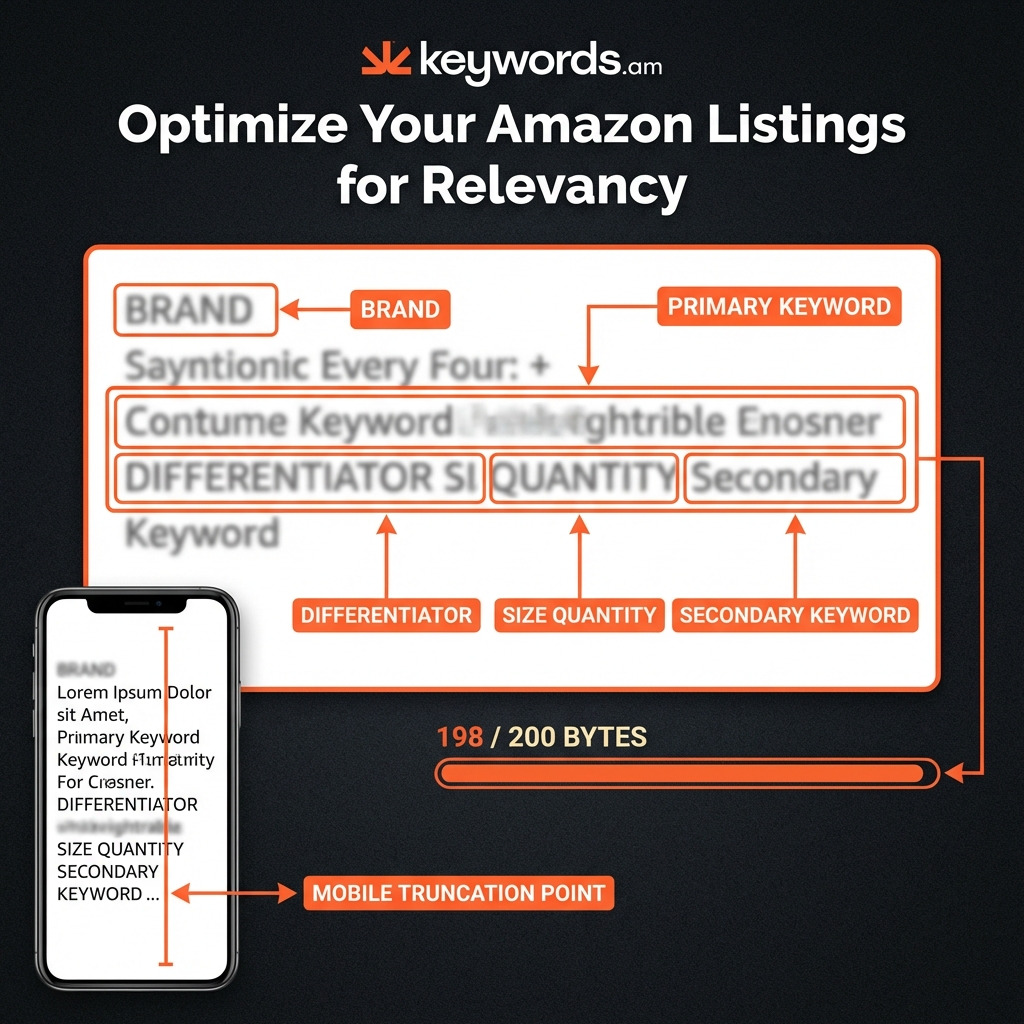
Brand + Primary Keyword + Key Differentiator + Size/Quantity + Secondary Keyword
Here’s an example with notes. See what you think.
- Title: SleekFlow [Stainless Steel Water Bottle] (Primary Keyword) – [1L, Insulated, Leakproof] (Differentiator) – [for Gym & Sports] (Secondary Keyword) – 1 Pack (Size/Quantity)
- Byte Count: This one clocks in around 145 bytes. That leaves you some room. Maybe you could sneak in another keyword.
Additional Title Examples by Category
Electronics:
- TechPro [Wireless Bluetooth Earbuds] - Active Noise Canceling, 40H Battery - [for iPhone & Android] - Black
- Byte Count: ~115 bytes
Here’s what matters: titles! They need to grab attention.
Home & Kitchen:
- ChefMaster [Nonstick Frying Pan Set] - 3-Piece, PFOA-Free, Induction Compatible - [8″, 10″, 12″ Skillets]
- Byte Count: ~105 bytes
Honestly, I’ve seen so many listings. It’s kind of overwhelming.
Health & Personal Care:
- PureGlow [Vitamin C Serum for Face] - 20% L-Ascorbic Acid, Hyaluronic Acid - [Anti-Aging, Brightening] - 1 fl oz
- Byte Count: ~120 bytes
Look, here’s some more title inspiration, organized by category. From what I’ve noticed, these perform pretty well. The TechPro [Wireless Bluetooth Earbuds] one, for example? That’s a good ‘un. Features like “Active Noise Canceling” and “40H Battery” are winners - sellers tell me that all the time. That one clocks in at ~115 bytes. But don’t forget about home goods.
Home & Kitchen:
- ChefMaster [Nonstick Frying Pan Set] - 3-Piece, PFOA-Free, Induction Compatible - [8″, 10″, 12″ Skillets]
- Byte Count: ~105 bytes
And the ChefMaster [Nonstick Frying Pan Set] listing is pretty straightforward. Byte Count: ~105 bytes. So, health and personal care? Let’s talk about it.
Health & Personal Care:
- PureGlow [Vitamin C Serum for Face] - 20% L-Ascorbic Acid, Hyaluronic Acid - [Anti-Aging, Brightening] - 1 fl oz
- Byte Count: ~120 bytes
The reality is, those get lengthy. Just gotta cram the deets in! The PureGlow [Vitamin C Serum for Face] title there? It’s a mouthful (byte count: ~120 bytes) – but necessary, it seems. Here’s the thing though: you can’t leave out the crucial information. You just can’t!
Mobile-First Title Strategy
Keyword placement in the title? Of course. Seriously, it matters a lot. Front-loading your primary keywords - it’s key. Honestly, there are two big reasons why. First, it gives those keywords more weight with the algorithm. And second, it makes sure they’re actually seen in mobile search results. Think about that for a sec.
On most mobile devices, you only see the first 80 characters of a title. That’s it. Shoppers scanning search results simply won’t see keywords way at the end. I’ve seen it tons of times. You don’t want that, trust me.
Here’s the thing though - titles look kind of different depending on what device you’re using:
- Desktop Display: Full title visible (up to 200 bytes)
- Mobile Search Results: First 80 characters visible
- Mobile Product Page: First 100-120 characters visible
The truncation is real, folks. The reality is, you only have a little space to work with on mobile, so make it count. What does that mean? The most important stuff - the brand, the main keyword, and what makes you different - needs to be right up front within those first 80 characters. Sellers tell me that burying their value proposition at the end makes them lose mobile shoppers before they even click. Don’t let that be you. Honestly, I’ve seen it happen a lot.
Title Mistakes That Cause Rejection
Sellers, listen up! You must avoid common mistakes. These screw-ups lead straight to rejection or suppression. Trust me, I’ve seen it a ton.
Here’s what matters:
- NO ALL CAPS (except for brand acronyms). This is a biggie - don’t do it.
- NO promotional phrases like “Best Seller,” “Sale,” or “Limited Time.” You’re supposed to inform, not scream at people.
- NO decorative special characters (e.g., ~ ! * $ ?). It looks super unprofessional.
- NO price or shipping information in titles. Listings are for that stuff.
- NO subjective claims like “#1” or “Top Rated” without proof. Back. It. Up!
Honestly, getting titles perfect is kind of a pain sometimes. But it’s gotta be done, right? And the reality is - it’s worth it.
A title editor – one that displays byte counts for different marketplaces – like the one inside the Keywords.am platform – can prevent errors that will cost you. It can help you avoid submission delays too, by validating your title in real time. I’ve seen people saved by this exact thing, so there you go.
So, get on it.
Bullet Point Optimization: Features That Convert to Sales
Bullet points are key. They’re “Features” in the TFSD setup - don’t forget that. Next to titles, they’re gold for keywords. But truth is, they can totally decide if someone buys or not.
So many sellers mess this up though. Honestly, I’ve seen a lot of listings, and the bullet points? Just dull feature lists. Snore.
Here’s what matters: listings that actually sell? They’re “benefit-first.” They talk directly to what the customer wants. It’s pretty simple.
Listing benefits is good, yes - but you’ve gotta be crystal clear. Don’t be vague.
It works, I’ve seen it work. Plain and simple.
The Benefit-First Formula
Okay, so the formula is pretty simple. You start with the biggest benefit. Shout it from the rooftops - in ALL CAPS, of course. Then, give a quick explanation of the feature behind it.
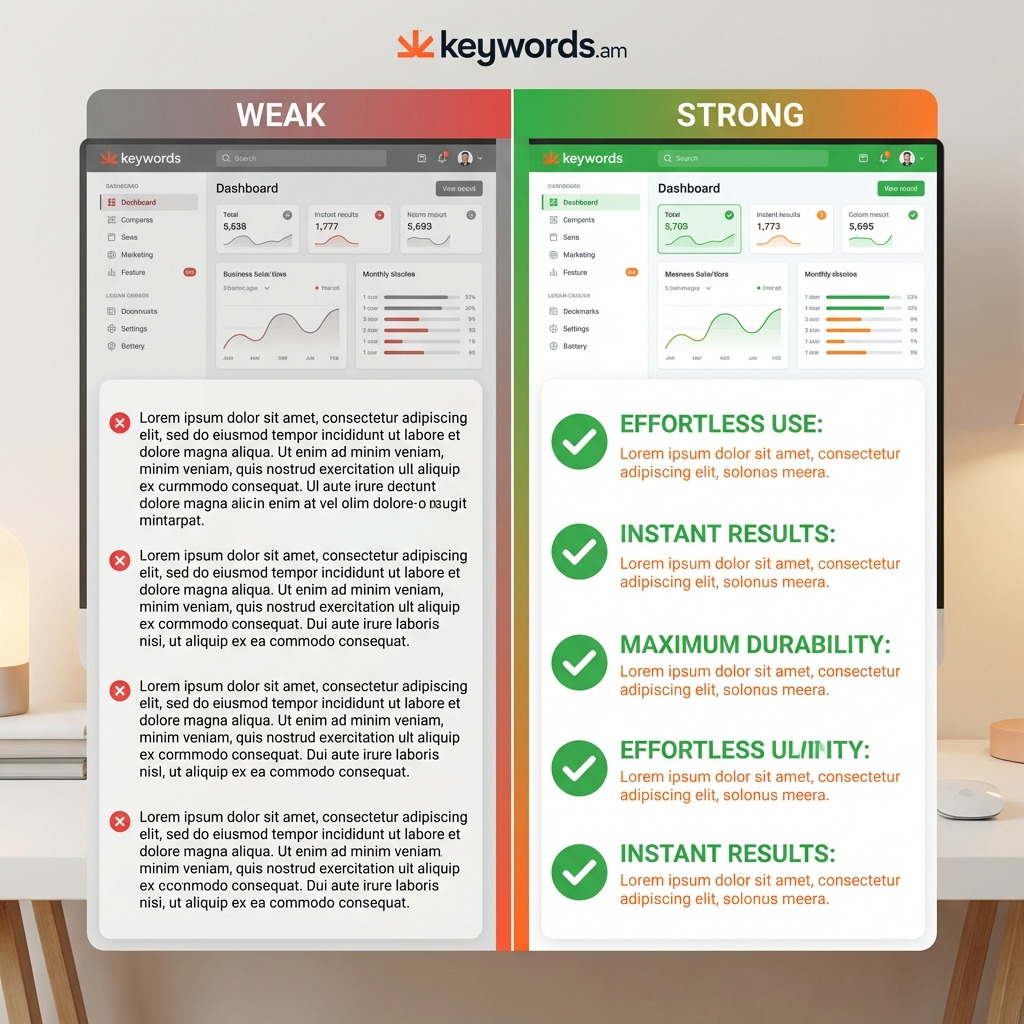
- Weak Bullet: “Made from 18/8 stainless steel”
- Strong Bullet: “KEEPS DRINKS COLD FOR 24 HOURS - Our double-walled vacuum insulated bottle, crafted from pure 18/8 stainless steel, ensures your water stays ice-cold from morning workouts to afternoon errands.”
That said, here’s the thing though - a weak bullet point? It just states a fact. Pretty boring, I think. A strong bullet? It hits you with what you actually get. Big difference. But sellers tell me it works. Like, really well. And honestly, from what I’ve noticed, customers eat that stuff up.
More Before/After Examples
Fitness Equipment:
- Weak: “Includes resistance bands in 5 different levels”
- Strong: “PROGRESSIVE TRAINING FOR ALL FITNESS LEVELS - Five color-coded resistance bands (10-50 lbs) allow gradual strength building, from rehabilitation exercises to intense muscle training.
Kitchen Appliances:
- Weak: “Has 10 speed settings”
- Strong: “PRECISE CONTROL FOR EVERY RECIPE - Ten variable speeds let users go from gentle stir to full puree, handling everything from delicate sauces to frozen smoothies with consistent results.”
Beauty Products:
- Weak: “Contains hyaluronic acid and vitamin C”
- Strong: “VISIBLE RESULTS IN 14 DAYS - Clinical-grade hyaluronic acid and 20% vitamin C work together to reduce fine lines by 45% and brighten dark spots, according to independent dermatological testing.”
Here’s what matters: these examples are gold.
Take fitness.
You could say “Includes resistance bands in 5 different levels.” Okay, sure. But, honestly? It’s weak. That’s not gonna sell anything. Now, this? “PROGRESSIVE TRAINING FOR ALL FITNESS LEVELS - Five color-coded resistance bands (10-50 lbs) allow gradual strength building, from rehabilitation exercises to intense muscle training.” Boom. That’s way better. It tells you what you actually get.
Kitchen stuff is the same.
“Has 10 speed settings” just doesn’t do it. It’s boring, right? But, “PRECISE CONTROL FOR EVERY RECIPE - Ten variable speeds let users go from gentle stir to full puree, handling everything from delicate sauces to frozen smoothies with consistent results.” That’s descriptive! It shows how those speeds help. That’s a lot more appealing, I think.
And beauty products!
“Contains hyaluronic acid and vitamin C” is… well, pretty generic. From what I’ve seen, that sort of thing won’t make anyone rush to buy. Instead, try something like this: “VISIBLE RESULTS IN 14 DAYS - Clinical-grade hyaluronic acid and 20% vitamin C work together to reduce fine lines by 45% and brighten dark spots, according to independent dermatological testing.” Yes! Now we’re talkin’. Showcase those results! It’s gotta grab attention.
The Five-Bullet Strategy
The reality is, you absolutely need a strategy that actually works. I’ve seen sellers use this five-bullet approach – and it works really well. It focuses on the whole buyer’s journey, which is what you want.
Here’s what matters, though: each bullet has to be spot on. No exceptions.
Here’s a breakdown:
1. Primary Benefit: Solve their main problem right away. Don’t bury the lede, seriously! What’s the single biggest thing your product does?
For example, if you’re selling a pressure cooker, it slashes cooking time – a lot. It’s that simple.
2. Key Feature: This is about highlighting what makes you different – your most unique selling point. Sellers tell me this is the tough one.
What sets your product apart from the competition? Is it some special material? A cool design or something? It can be anything, honestly.
3. Use Case Scenario: Help the shopper picture themselves actually using your product. You want them thinking, “Hey, I could totally see myself doing that!” Paint a picture for them.
For instance, “Imagine whipping up a delicious weeknight dinner in under 30 minutes with the Instant Pot.” That’s what you want. Get them dreaming a little.
4. Specifications: This is where you give the essential technical details – the nitty-gritty. Think size, material, what’s included in the box. People want to know exactly what they’re getting, so don’t skimp here.
Worth noting: people check this. It really does matter.
And finally:
5. Trust Builder: Offer a warranty, guarantee, or some social proof (like customer reviews) to squash any hesitation. It’s all about reassuring the buyer that they’re not making a mistake. Guarantees can do wonders - I’ve seen it myself, honestly. They just work, plain and simple.
Category-Specific Bullet Strategies
Different categories require different approaches. Honestly, it’s pretty obvious.
Tech Products: Performance specs first, always. But compatibility? That also matters a lot. Buyers need to know your stuff plays well with their current setup. I’ve seen so many questions about this. Wouldn’t you ask, too?
Health/Beauty: Results are key, no doubt about it! And ingredients are super important, of course. Buyers want claims backed by real data - they’re not just gonna take your word for it. They want cold, hard proof!
Home Goods: Here’s what matters: can it handle daily use and is it easy to use? Buyers want your product to make their lives simpler, not harder. It’s gotta be straightforward.
Consumables: Taste or quality usually wins. Then it’s all about value - how much are you getting? Buyers are always hunting for that sweet spot - a lot of product for not a lot of money. Sellers tell me this all the time, and I’m the same way!
Secondary keywords? Work them in naturally, that’s my advice. The thing is, you want to get noticed without sounding like a bot. It’s a tough balancing act, the reality is. US bullets can be 500 characters – but readability? I’ve found shorter is better, maybe 250 bytes. On phones, only ~200 characters are visible before “Read more” pops up, so lead with your most compelling point! Bam! Using tools with Coverage indicators can help track where you’re using your keywords - like in the title versus the bullets. And don’t repeat yourself. That’s wasted space, you know?
Backend Search Terms: The Hidden Ranking Multiplier
Backend search terms? They’re a secret weapon, honestly. A way to get your products seen. I’m serious.
This field indexes your products for a ton of searches. You don’t need to cram them into the customer-facing stuff. That’s what’s great! It’s perfect for keyword variations. Synonyms? Great. Misspellings? Sure. And long-tail terms are winners - especially if they didn’t fit in your title or bullet points.
Sellers tell me they aren’t sure what to put here. Don’t be shy! Cast a wide net. Breadth is key here.
Here’s what matters though: think about the words people use. Similar words. For example, sell “dog sweaters”? Then include “dog jumpers.” Or, for “coffee grinder,” try “coffee mill.” See? That’s it.
People skip this part - from what I’ve noticed. Huge mistake! It’s extra digital real estate that you shouldn’t ignore. And that helps Amazon understand what you sell. It’s a good thing, believe me.
Understanding the 249-Byte Limit
Here’s what matters: the 249-byte limit. Honestly, it’s the big one. Amazon’s system? It only looks at the first 249 bytes in this field. After that, it’s like it doesn’t even exist. 249 bytes, that’s all you get. The limit is in bytes, not characters. International sellers should really pay attention to that! Characters can take up multiple bytes, so it’s a factor. You gotta be careful.
You’ve got to be brutal with what you leave out to get the most from this tiny space. Wasting space? That’s a huge mistake, in my experience. Here’s the thing though, don’t put these things in:
- Commas or special characters: They eat up bytes and aren’t needed. Use spaces instead. It’s way more efficient.
- Repeated words: Don’t repeat stuff from your title or bullets. Amazon indexes each word just once per listing. I’ve seen sellers do this all the time - total waste.
- Brand names: This means yours, and your rivals’. Using competitor names gets you in trouble too (it can trigger policy violations). Sellers tell me this all the time.
- Prohibited terms: Amazon has a list of words you can’t use. Break the rules, get penalized. It’s not worth it.
- ASINs or UPCs: Product IDs aren’t indexed, so they’re pretty much useless here. Kinda pointless.
- Temporary statements: “New” or “sale” become old news, right? They’ll just sit there.
And that’s pretty much it! Keep it short and relevant.
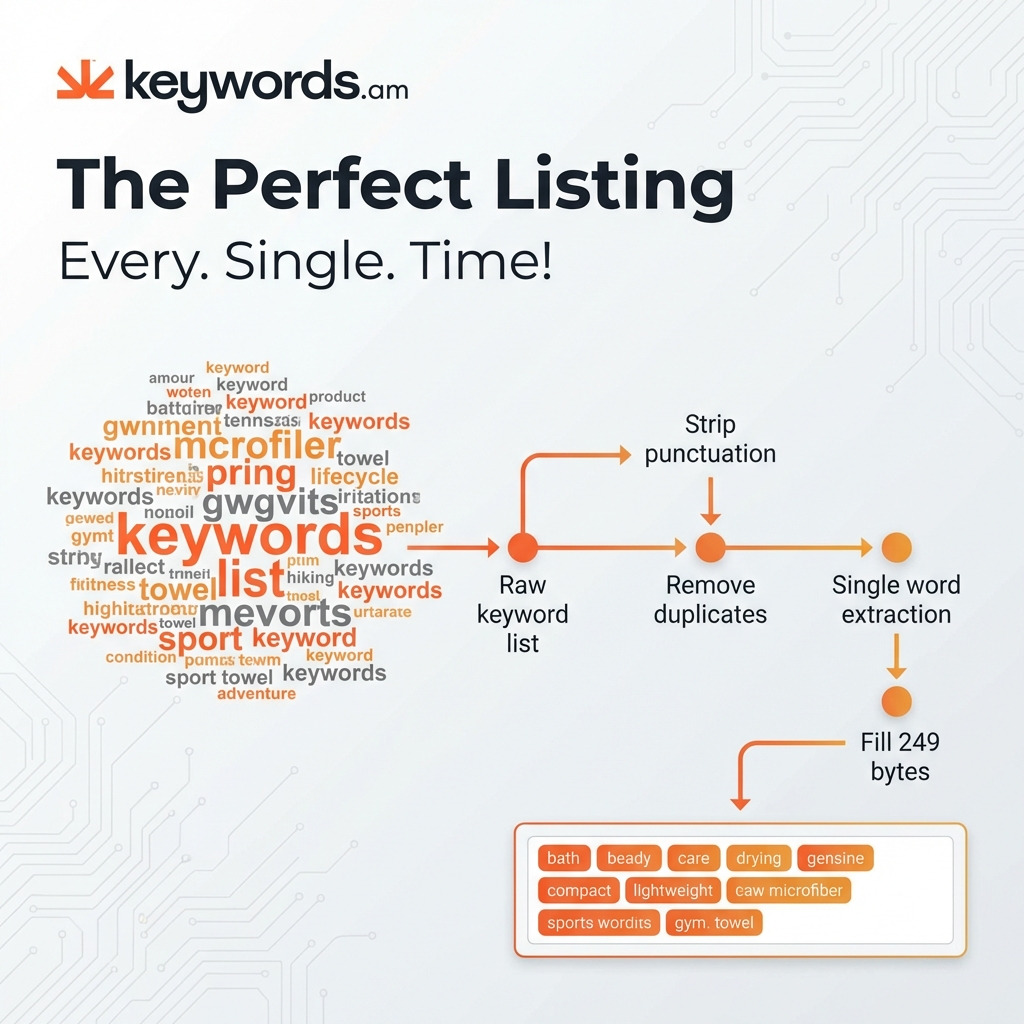
The Swiss Army Knife Method: Step-by-Step
The “Swiss Army Knife” method? It’s a workflow. And a pretty good one for nailing that backend keyword field, honestly. I’ve seen it work wonders.
Step 1: Export Your Master Keyword List
First: keywords. You absolutely need them all in one place. Competitor analysis is key. Autocomplete suggestions? A must. PPC search term reports too. Get them all – I mean it!
Step 2: Create a “Used Words” List
Extract every single word from your title. And your bullet points, of course – can’t forget those. Just the unique words, though. Singular and plural forms, too. That’s what I always do; it’s important.
Step 3: Remove Used Words from Master List
Cross-reference time. Then, remove words that already show up in your visible copy. The reality is, you don’t want repeats. Nobody wants that.
Step 4: Strip All Punctuation
Time to get rid of commas and hyphens. Apostrophes – all that stuff has to go. Special characters, too. Amazon indexes “anti-aging” and “antiaging” the same way. So, honestly, it’s just wasted space. Pointless, really.
Step 5: Deduplicate
Remove duplicate words from the list. Each word only needs one appearance, honestly. Get rid of the extras!
Step 6: Convert to Single Words
Break multi-word phrases down into single words. “yoga mat” becomes “yoga mat” (two words). Simple as that, right?
Step 7: Prioritize and Fill
Arrange words by search volume – highest first. Then fill up to 249 bytes. Not 250 – yep, exactly 249.
Here’s the thing though: this whole process can be automated. Swiss Army Knife for backend keywords – it’s part of the Keywords.am suite. Sellers tell me it saves tons of time. And from what I’ve noticed, it makes sure you get maximum keyword coverage pretty much automatically.
Common Backend Keyword Mistakes
- Wasting space on obvious plurals: Amazon handles basic pluralization automatically. So, you don’t need “bottles” if you already have “bottle.”
- Including the brand name again: It’s already indexed from the title - trust me on this one.
- Adding competitor brand names: Big no-no. Policy violation risk is real.
- Using full phrases when single words suffice: “stainless steel water bottle for hiking” should just be “hiking” (if other words are already covered). Honestly, be efficient.
The thing is, keyword mistakes happen. A lot! But some? They’re super common. I’ve seen it tons of times, and it’s honestly kind of face-palm worthy. Here’s what matters: those backend keywords are precious! Don’t waste ‘em. Every character counts, right? Worth noting: Sellers tell me they’ve been penalized for these errors. Yikes. And, here’s a specific example: I once saw someone sneak “apple” into the backend of a competitor’s listing. Big mistake. Don’t do that kind of thing (or anything close to it). Truth is, it’s just not worth the risk, in my experience. The potential downside is way too big. So, avoid these, okay? They’re pretty much the biggest pitfalls I’ve noticed. Don’t fall for them. And there’s more.
Product Description Optimization: The Conversion Closer
The product description? It doesn’t have the indexing power of titles, honestly! But here’s what matters: it can clinch the sale. Sellers tell me they really flesh out the product’s story here. It lets you expand on benefits and zap buyer doubts. I’ve seen it work wonders – trust me.
Brands in Amazon’s Brand Registry get A+ Content instead of a normal description. A+ Content - should be your aim! It lets you tell visual stories (with pictures – tons of them), use comparison charts, and it’s got better formatting. This can really boost sales. From what I’ve noticed, it makes a huge difference – a massive one, in fact.
If you don’t have Brand Registry, you can still tweak your standard description. Make it easier to read. Amazon’s got limited HTML support. But you can use basic tags like <b> for bolding. And <p> tags will split up text blocks, making the content easier to scan. That said, worth doing, right?
Keyword strategy? Focus on any long-tail keywords you missed. Variations not covered elsewhere. It is your last chance to get solid search term coverage. Seriously. No joke.
The Complete Amazon Listing Optimization Workflow
A systematic workflow matters. It’s pretty simple, right? It makes sure every single part of your listing shines - for both the A10 algorithm and, honestly, human shoppers. You can’t just focus on keywords. That won’t cut it.
The reality is, you need a process. And a solid process will save you so much pain down the road. I’ve seen listings absolutely skyrocket with the right moves.
Here’s the thing though: you can’t just throw spaghetti at the wall and hope something sticks. It needs to be structured (and make sense!). Trust me on this.
It helps conversions a lot. Optimization needs focus - you can’t just half-ass it, from what I’ve noticed. You really gotta commit.
Step-by-Step Optimization Checklist
Step 1: Keyword Research Foundation
Here’s what matters: keyword research kicks things off. A Reverse ASIN lookup on your 3-5 top competitors? That’s the quickest way I’ve found to find high-intent keywords that are selling. Prioritize that list by relevance and how often folks search for ‘em. And you’ll find all the details in a complete Amazon keyword research methodology.
- Run reverse ASIN on top 5 competitors
- Export PPC search term reports (if available)
- Gather Amazon autocomplete suggestions
- Prioritize keywords by search volume and relevance
- Identify negative keywords to exclude. Seriously!
Step 2: Title Optimization
So, use that list to craft your title. The thing is, I’ve seen a 200-byte formula work well: Brand + Primary Keyword + Differentiator + Size/Quantity + Secondary Keyword. Front-load the most important keyword, though! Byte count matters - triple-check it. I can’t stress that enough, honestly.
- Place primary keyword within first 80 characters
- Include brand name at the beginning
- Add key differentiators, of course
- Include size/quantity information
- Verify byte count is under 200
- Check for prohibited words/characters. Important!
Step 3: Bullet Point Creation
Write those five bullet points. Start with the benefit - it works wonders, in my experience. And spread your other keywords throughout. Don’t repeat keywords from the title, though! I’ve seen it a lot. It’s a pretty common mistake.
- Write benefit-first opening for each bullet
- Distribute 10-15 secondary keywords across bullets
- Check no keywords duplicate title terms
- Verify each bullet under 500 characters
- Ensure first 200 characters contain key message
Step 4: Backend Search Terms
Extract unused single words from your main keyword list. The Swiss Army Knife method means stripping punctuation and removing words from the title and bullet points. Combine the unique terms with spaces and fill that 249-byte limit. Easy, right?
- Export remaining unused keywords
- Strip all punctuation
- Remove words already in title/bullets
- Deduplicate remaining words
- Fill to exactly 249 bytes
Step 5: Description / A+ Content
Write a product description or build A+ Content modules. Sellers tell me this space is about the brand’s story, using long-tail keywords, and selling the product. Connect with your audience there.
- Cover remaining long-tail keywords
- Create compelling brand story
- Add social proof and trust elements
- Include clear call-to-action
Step 6: Validation
Give it a final check before you publish. Byte and character limits matter, trust me! Check for words that violate Amazon’s policies. And confirm keyword coverage. The reality is, an AI tool like Amber AI for listing audits can seriously help with this.
- Verify all byte/character limits
- Check for policy-violating terms
- Confirm keyword coverage is comprehensive
- Test all images display correctly
- Preview listing on mobile device
7 Amazon Listing Optimization Mistakes That Kill Your Rankings
You might have the best workflow ever. But common mistakes will still mess up your optimization. Avoiding these? It’s as important as doing everything else “right.” Here’s what matters: don’t screw up the basics. Seriously.
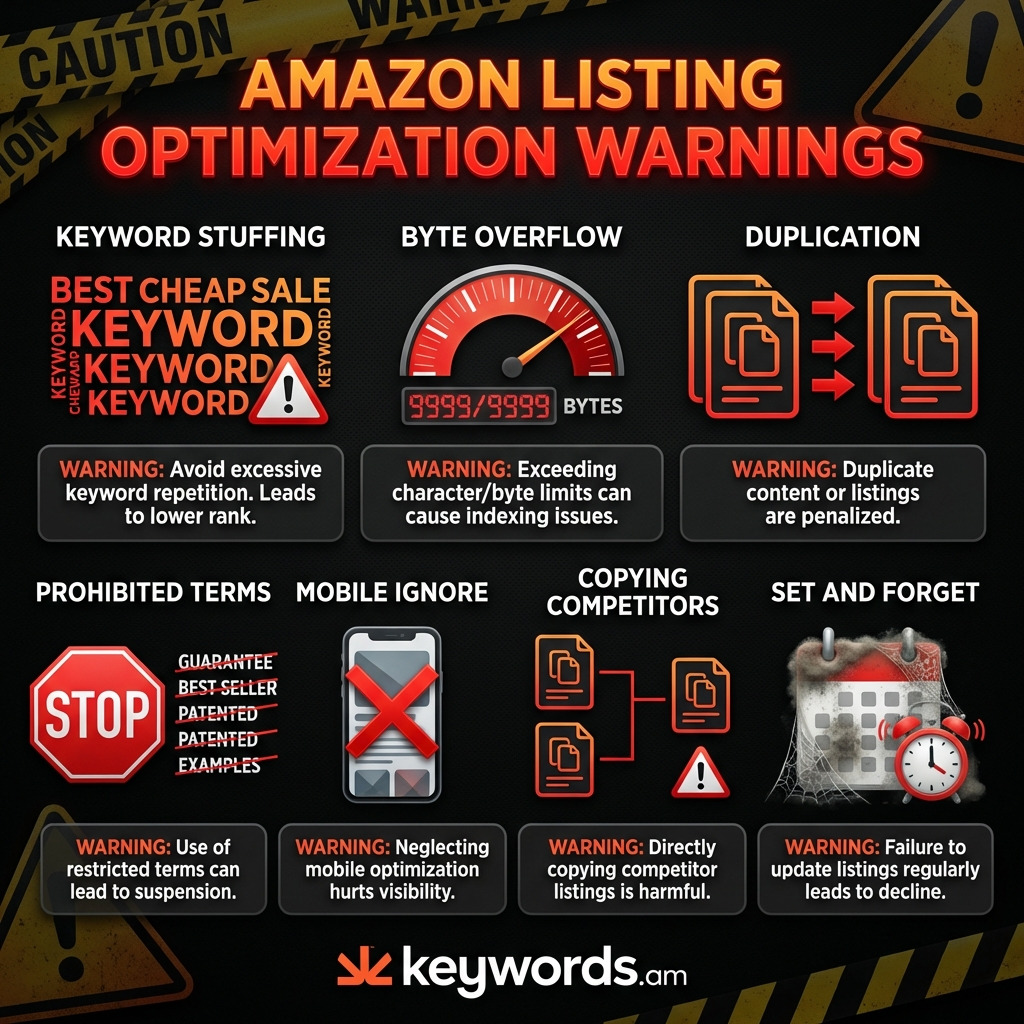
- Keyword Stuffing in Titles: This makes your listing hard to read. And Amazon might suppress it - it looks unnatural, right? I’ve seen listings tanked because of this. Don’t do it.
- Ignoring Byte Limits: Titles get rejected, launches delayed. That costs you momentum. The reality is, you have to know the difference between characters and bytes. It’s pretty basic stuff, honestly.
- Duplicating Keywords Across Fields: Here’s the thing though, this is a common mistake. What a wasted chance. Amazon indexes each unique word once. Repeating a keyword in the backend when it’s already in the title? Zero extra ranking boost. Don’t do it!
- Using Prohibited Terms: “Best” or “premium”? Watch out. Or “organic” without the certification. Your listing can be flagged—or even removed. Truth is, Amazon is strict. Super strict.
- Neglecting Mobile Truncation: Over 70% of Amazon shoppers are on mobile devices. Worth noting, if you don’t nail the first 80 characters of your title, people won’t see your main selling points. I’ve seen this happen a lot; people just don’t scroll.
- Directly Copying Competitor Listings: Amazon’s duplicate content filters are pretty good - pretty, pretty good. And copying can lead to your listing getting de-indexed or suppressed. Don’t be lazy! Come on now.
- A “Set-and-Forget” Mentality: Amazon changes constantly. So do algorithms. And so do competitors. New keywords come from customer searches. Listings should be checked and tweaked quarterly—at the very least. That’s what I recommend, anyway, from what I’ve noticed.
FAQ - Amazon Listing Optimization Questions
1. How do I write an Amazon listing that ranks?
Here’s what matters: you’ve gotta be smart. TFSD is useful - honestly. Put your BEST keywords in the title. Secondary keywords? Bullet points. And then, backend search terms pick up the rest. Simple!
2. What is the fastest way to build Amazon listings from scratch?
Start by snooping on competitors - reverse ASIN analysis. Find their winning keywords. Then? Follow TFSD: title (200 bytes), bullets (5 benefit-first), backend (single words), description. It’s straightforward, I’ve seen it work a lot.
3. How many keywords should I put in my Amazon listing?
Quality beats quantity, it’s true! Title: 3-5 top keywords (sounding natural, of course). Bullets? Maybe 10-15 more. The backend’s where you can add tons - like 50-100 single-word variations. So, like 100-200 total. That’s pretty normal from what I’ve noticed.
4. Does Amazon listing optimization actually increase sales?
Yes! Optimized listings rank higher - a lot higher. Compelling titles get clicks - that’s obvious. Benefit-driven bullets? They drive sales. The end result is more organic visibility, which boosts sales by maybe 20-50%. Truth is, I’ve seen even bigger jumps.
5. How often should I update my Amazon listing?
At a minimum, audit quarterly. Update when launching new keywords (PPC data!), competitors change stuff, or Amazon tweaks limits. But - here’s the thing though - don’t go changing things if sales are great!
6. What are backend search terms on Amazon?
They’re hidden keywords - up to 249 bytes. They help Amazon index your product, but don’t show up in the listing. Use ‘em for misspellings, synonyms, long-tail stuff you couldn’t fit anywhere else.
7. How do I optimize my Amazon listing for mobile?
Front-load titles - the first 80 characters are key, sellers tell me. Lead bullets with benefits - gotta grab attention fast! Focus on the first 200 characters too. A+ Content (mobile-friendly images) helps - if you’re brand-registered, anyway.
8. What is the TFSD framework?
TFSD: Title, Features (Bullet Points), Search Terms (Backend), Description. Amazon indexes those four fields. That’s it, pretty much. Prioritize keywords based on weight: title, then bullets, then backend, then description.
Conclusion
So, here’s what matters: Amazon listing optimization in 2026? It’s not about keyword stuffing anymore. Seriously outdated. It’s a discipline - a game of placement.
Success comes down to understanding the A10 algorithm. It likes listings that are relevant and that sell. The TFSD framework is your roadmap, honestly. It shows you how to use the right keywords where they count - Title, Features, Search Terms, and Description - based on algorithmic weight.
Remember: bytes matter more than characters! Every byte counts in the backend search term field. Deduplicate keywords like crazy to reach more people.
And here’s the thing though: what’s the quickest win here? Audit your top three SKUs using the TFSD framework. I’ve seen sellers get big improvements from that alone.
Check title byte counts - are they too long? Are your bullet points benefit-driven, or just features? Are you repeating keywords in the backend? Fixing these can get you results faster. Worth noting: sellers tell me this stuff really works.
Ready to optimize faster? Keywords.am’s workspace handles byte counting, coverage tracking, and keyword deduplication - letting sellers focus on copy that converts. Start your free audit →