Keywords (Lists & Research)
How to Use the “Eye” Icon to Quickly Find Missing Keywords
How to Use the “Eye” Icon to Quickly Find Missing Keywords

When optimizing your listing, one of the most powerful (yet often overlooked) features in Keywords.am is the eye icon in the keyword list. This simple tool lets you instantly focus on the keywords you haven’t used yet - saving you time and helping you boost listing performance.
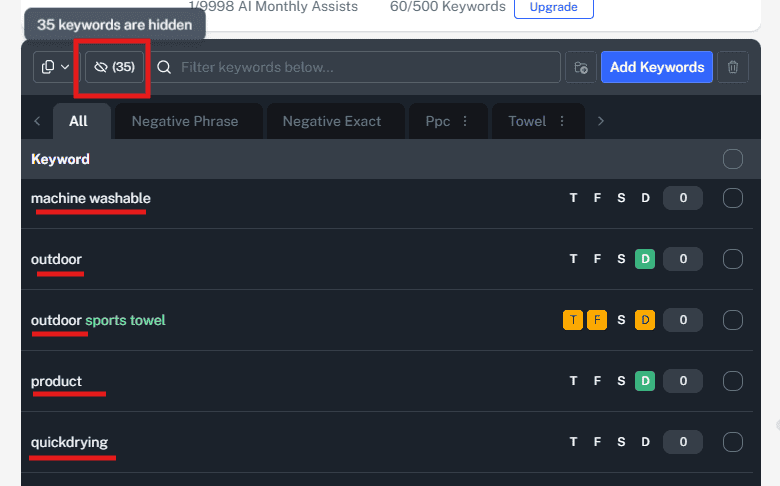
What Does the Eye Icon Do?
The eye icon acts as a visibility toggle.
-
When enabled (eye is open), you see all keywords - used and unused.
-
When clicked (eye is closed), it hides all keywords that are already used somewhere in your listing.
Used means the keyword is present in at least one of these areas:
-
T = Title
-
F = Features (bullet points)
-
S = Search Terms (backend)
-
D = Description
Once you activate the filter, only unused or partially used keywords will be shown.
Why This Feature Matters
Laser-focus your optimization - Instead of scanning the entire list and manually checking which keywords are still missing, just click the eye icon. You’ll instantly see what still needs to be worked in.
Faster workflow = better efficiency - This is especially useful for:
-
Copywriters building listings from scratch
-
Sellers editing live listings
-
Agencies managing multiple ASINs under time pressure
Helps avoid overuse or stuffing - If a keyword is already used in your title and top bullets, you can confidently move on.
Pro Tips for Using the Eye Icon
Use it after adding new keywords Just added a batch of high-volume or converting terms to your keyword list? Click the eye icon to see which ones haven’t made it into your listing yet.
Combine it with grouping If you’re using keyword groups (like “PPC winners”, “Search Term Converts”, etc.), filter your group and click the eye. You’ll see exactly which high-impact keywords still need to be used.
Scan your backend search terms last Once your title, bullets, and description are covered, use the eye icon to find stragglers - then fill in the remaining unused terms into the backend search terms area.
Batch edit with intention After using the filter, copy a few remaining keywords and build them into your features or description naturally. Don’t force them all - prioritize relevance and flow.
Final Thoughts
This small feature can have a big impact on your listing quality and keyword coverage. By focusing only on the missing terms, you avoid clutter, save time, and stay strategic with your word choices.