Keywords (Lists & Research)
Swiss Army Knife – Keyword Processor Help Guide
Swiss Army Knife – Keyword Processor Help Guide

The Swiss Army Knife in Keywords.am is a powerful utility tool designed to help Amazon sellers, marketers, and content creators clean, filter, and manipulate raw keyword data quickly. Whether you’re optimizing an Amazon listing, preparing backend search terms, or conducting keyword research, this tool simplifies the messy process of working with large keyword sets.
How It Works
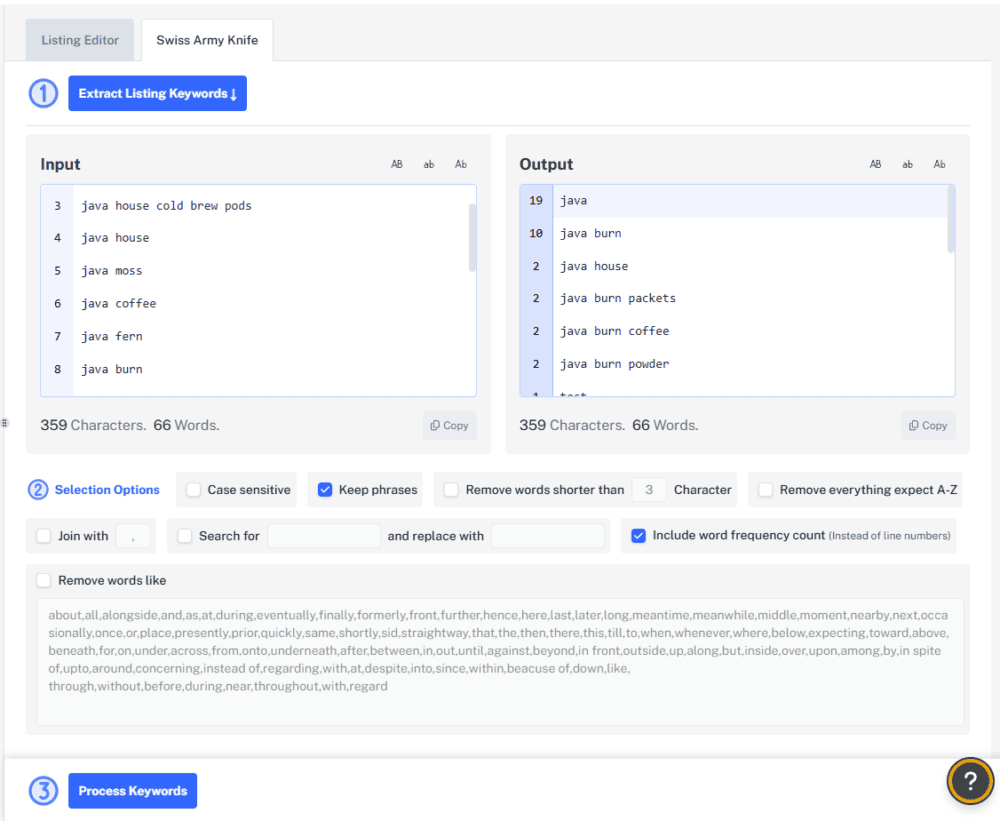
The Swiss Army Knife is designed to be used in sequence as labeled in the interface. Step 1: Input your raw keywords Paste them into the input box or import from your saved Keyword List. Step 2: Choose your filters Clean, combine, format, and remove noise with easy toggle options. Step 3: Process Keywords Generate a polished output you can copy, export, or reuse.
What It Does
The Swiss Army Knife helps you:
- Clean messy keyword lists
- Remove filler/stop words
- Combine keywords into usable formats (e.g., comma-separated)
- Count word frequency
- Customize and transform keyword text
It’s ideal for turning raw research or competitor data into structured, optimized lists for Amazon listings.
When to Use It
Use the Swiss Army Knife:
- After extracting keywords from Amazon listings or competitor ASINs
- When importing raw keyword lists from tools like Helium10, Data Dive, Brand Analytics, or any CSV/Excel dump
- Extracting certain keywords from your keyword list and getting them ready for an ad campaign
- To prepare A/B test variations for title, bullet points, or description
- To count keyword frequency for ranking analysis
Key Features & How to Use Them
1. Input Keywords
Paste your keywords into the Input box on the left or import them from your Keyword List. Each line should be a single phrase or word. Duplicates are fine - the tool will clean them.
2. Selection Options
Option What it does Case Sensitive Keeps uppercase/lowercase distinctions Keep phrases Preserves multi-word phrases instead of breaking them into single words Remove words shorter than X characters Filters out short words (like “an”, “to”, “on”) Remove everything except A-Z Strips punctuation, numbers, and non-letters
3. Word Filtering & Replacements
Option What it does Join with (, | ; ) Combines keywords into a single string separated by your chosen delimiter Search for / Replace with Replace specific terms in bulk Remove words like Eliminates common “filler” words like the, in, with, from, etc.
4. Frequency Mode
Enable “Include word frequency count” to view how often each word appears in your keyword set. This is great for identifying top-converting or commonly used terms.
5. Output Area
Once processed, your cleaned keywords will appear in the Output box on the right. Use the Copy button to quickly paste them into your listing or spreadsheet.
Pro Tips
- Backend Search Terms: Use the “Join With” option (comma or space) and remove stopwords to get a clean, high-performing backend term string.
- Content Optimization: Use frequency counts to see which terms deserve to be in your Title vs. Bullets vs. Description.
- Listing Analysis: After using “Extract Listing Keywords,” run the results through this tool to simplify and categorize them.
- Export & Reuse: Copy the processed output and save it for tracking keyword updates or running future audits.
Example Use Case
Let’s say you extract a bunch of keywords from your competitors: best cold brew coffee java house cold brew pods cold brew packs java burn packets coffee for energy You can:
- Paste them into the input box.
- Enable “Remove stop words” and “Remove words shorter than 3”.
- Choose “Join with”.
- Get a clean backend search term string in one click.